

Transfer your
Vimeo videos to Google Drive
Move your entire Vimeo library to Google Drive or Google Workspace, folders included. Fast, private, and no local storage needed.
Try 10 files or 3 GB free · no credit card required
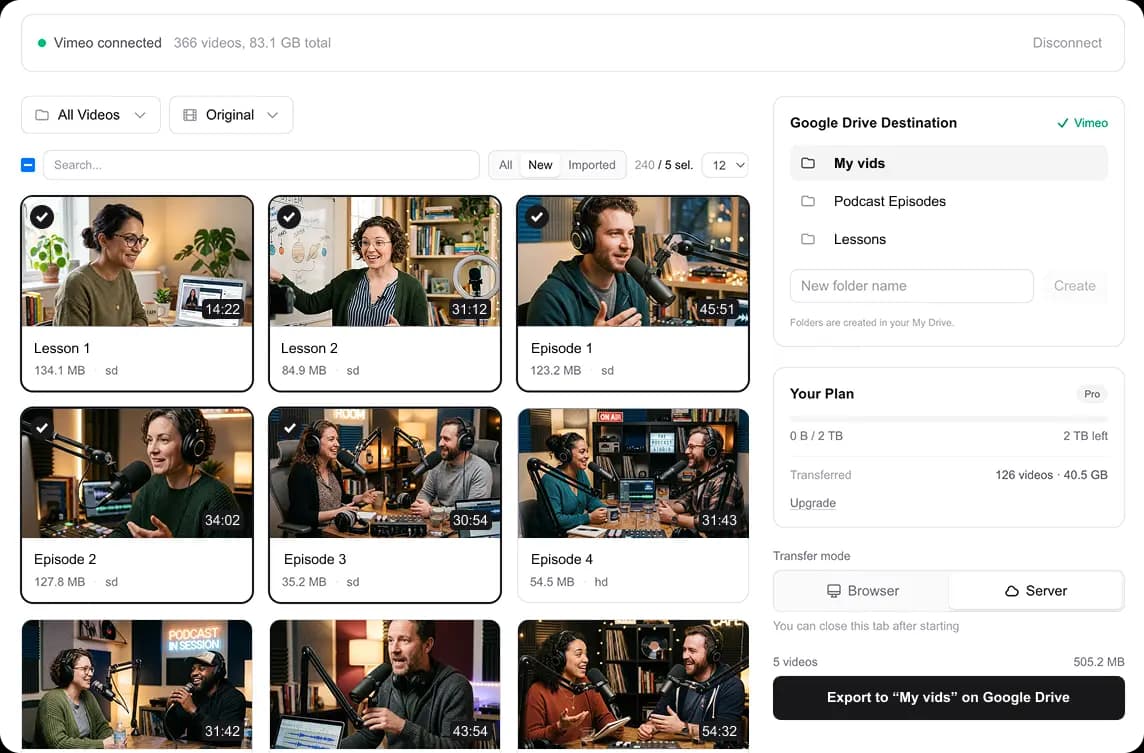
Select videos from Vimeo, pick a Drive folder, and start transferring
How it works
Connect your Google account
Sign in with Google to grant access to your Drive or Shared Drive.
Select and transfer
Pick the videos you want, choose a Drive folder, and start copying. Your Vimeo folders are recreated in Drive automatically.
Built for simplicity and privacy
Data-center speed
Our servers stream videos directly from Vimeo's CDN to Google Drive. A 600 GB library moves in 30 to 40 minutes. Close your browser, come back later.
Your files, your Drive
Videos go straight from Vimeo to Google Drive. Nothing is stored on our servers long-term. Credentials are scoped to the files we create, nothing else.
Google Workspace support
Works with personal Google Drive and Google Workspace Shared Drives for team accounts.
Batch transfers
Select multiple videos at once. Transfer your entire Vimeo library in one session with automatic retry on failures.
Your folders, recreated
Videos land in Drive folders matching the ones you built on Vimeo, created automatically inside the destination you pick. No afternoon of re-sorting after the move.
Pricing
One payment. No subscriptions.
Pick the size that fits your library. The same pack also covers Vimeo straight to your own disk.
Up to 500 GB
$39.99
$0.08/GB
- •Google Drive or your own disk
- •background transfers
- •repeat transfers are free
- •never expires
Up to 2 TB
$79.99
$0.04/GB
- •Google Drive or your own disk
- •background transfers
- •repeat transfers are free
- •never expires
Up to 7 TB
$129.99
$0.018/GB
- •Google Drive or your own disk
- •background transfers
- •repeat transfers are free
- •never expires
Frequently asked questions
Short answers to the things people ask before buying.
Ready to move your videos?
Connect your Google account and start transferring your Vimeo videos to Google Drive in minutes.