

Download all your
Vimeo videos
Save your entire Vimeo library straight to a folder on your computer, organized in the same folders you built on Vimeo. Nothing touches the cloud.
Try 10 videos or 3 GB free · no credit card required
Works in Chrome, Edge, Arc, and Brave. Not Safari or Firefox.
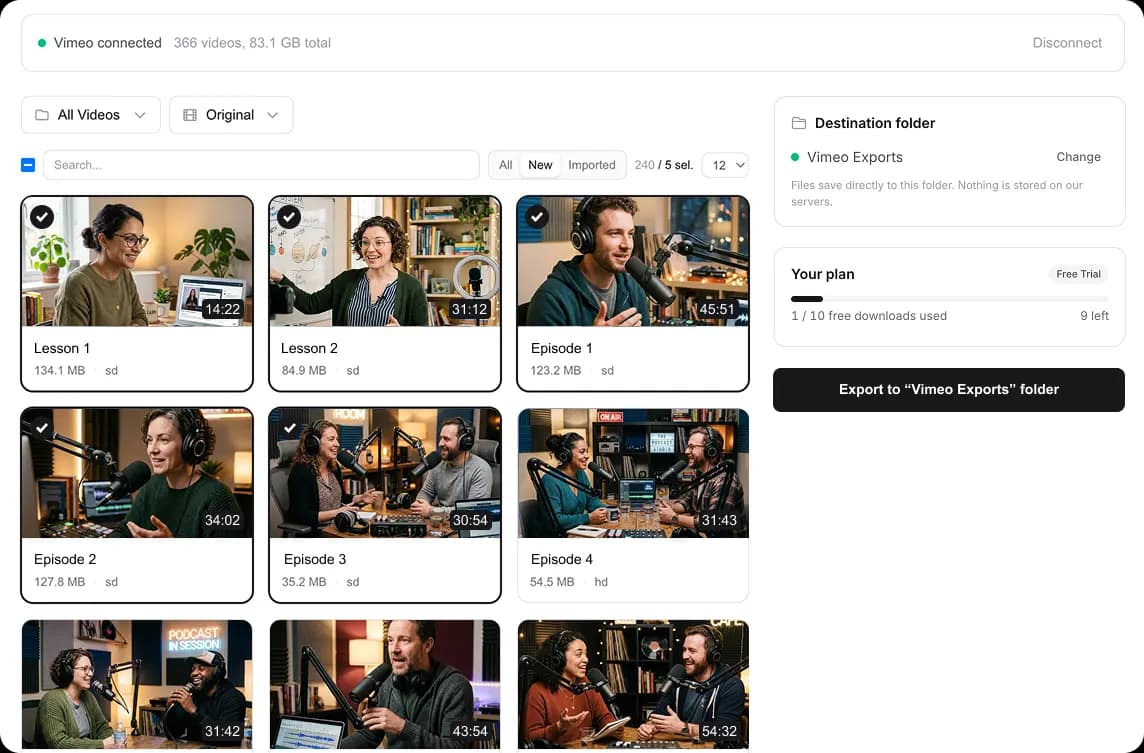
Select videos from Vimeo, pick a folder on your disk, and start downloading
How to download all your Vimeo videos at once
Sign in
With Google or your email address. It's only to remember your purchase: no Drive access, no permissions you don't need.
Pick a folder and go
Choose any folder on your computer. Select the videos you want, click start, and the files land there, sorted into subfolders that match your Vimeo folders.
Step by step
- Check that your Vimeo plan allows API downloads: Starter or above. Which plans qualify
- Create a Vimeo personal access token with the private and video_files scopes. Token guide
- Open the tool in Chrome, Edge, Arc, or Brave and sign in.
- Paste your token. Your library loads with the number of videos and its total size, so you know how much space you need.
- Set the page size to All and tick the select-all box. Leave quality on Original for the files you uploaded.
- Pick a folder on your computer or on an external drive, and start.
- Keep the tab open until the download panel says Downloads complete. Later, the New filter shows only videos you haven't downloaded yet.
Built to download, nothing else
Saved to your disk, not the cloud
Files go straight from Vimeo to the folder you pick. No Google Drive, no Dropbox, no sign-up for another storage service.
One payment, no subscription
Buy the pack that fits your library and it never expires. No monthly fee, no renewal, and the same pack works for Vimeo to Google Drive too.
Original quality or pick a size
Defaults to the highest quality Vimeo has for each video. Switch to HD or SD from a dropdown if you want smaller files.
Your folders arrive intact
Each video is saved into a subfolder named after its Vimeo folder, so the library lands on disk already organized. Want one flat folder instead? Toggle it off.
Works in Chrome and Edge
Saving straight to a folder needs a browser that allows it: Chrome, Edge, Arc, or Brave. Safari and Firefox don't support it yet.
Pricing
Pay once. Keep your videos forever.
Pick the size that fits your library. The same pack also covers Vimeo straight to Google Drive.
Up to 500 GB
$39.99
$0.08/GB
- •Google Drive or your own disk
- •background transfers
- •repeat transfers are free
- •never expires
Up to 2 TB
$79.99
$0.04/GB
- •Google Drive or your own disk
- •background transfers
- •repeat transfers are free
- •never expires
Up to 7 TB
$129.99
$0.018/GB
- •Google Drive or your own disk
- •background transfers
- •repeat transfers are free
- •never expires
Frequently asked questions
Short answers to the things people ask before buying.
Ready to download your Vimeo library?
Pick a folder, sign in, and start saving your videos to disk. Your first 10 videos or 3 GB are free, whichever comes first.