

For wedding videographers
Move your wedding film archive off Vimeo
Every couple's film, moved to your own drive, Google Drive or a Shared Drive in the highest quality Vimeo has, with one folder per couple kept just as you built it.
Try 10 videos or 3 GB free · See pricing
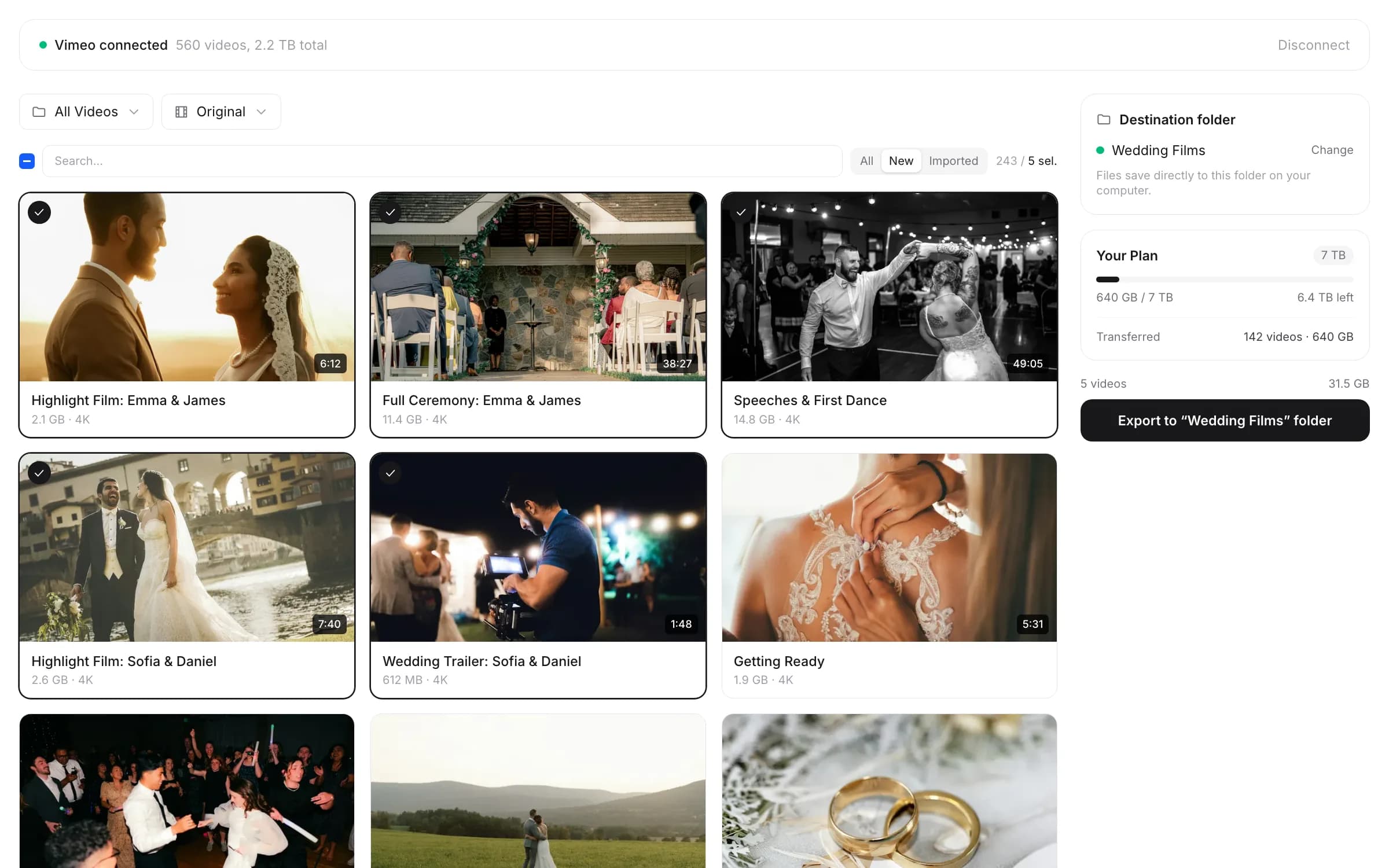
Pick a folder or a drive, select your couples, and start
Years of couples, on someone else's plan
Most wedding archives grew one Saturday at a time. A highlight film, a full-length edit, maybe the ceremony and speeches, delivered on a private link or a password page and then left where they were. A few seasons later that's hundreds of couples and terabytes of 4K, all living on one Vimeo plan.
Then a couple emails: they lost the USB, the old link doesn't play, can you send the film again? It might be three years later. If Vimeo is the only place that film lives, your answer depends on a plan, a renewal and a policy you don't control. When a paid plan lapses, the account drops to Free and newer videos are restricted until you pay again (what happens when you cancel Vimeo).
this2that copies the whole account in one run, with one folder per couple exactly as you organized it on Vimeo, onto storage you own. Sending a couple their film again is then just sharing a folder.
Want a list first? Vimeo to Google Sheets puts every video, folder, size and play count in one spreadsheet, a handy index of who you filmed and when.
Why wedding studios are taking a copy now
Two Vimeo rules matter to wedding filmmakers in particular:
- Bandwidth. Vimeo sets a bandwidth threshold of 2 TB a month, and downloads count toward it as well as plays. A film shared with a full guest list in the week after delivery can use a lot in a short time. If an account goes over 2 TB in a month twice in 12 months (or over 10 TB once), Vimeo may reach out, expects a resolution within 7 days, and can then temporarily suspend playback. What Vimeo's bandwidth rules say, and what to do first
- Plan type. Vimeo's Plan Usage Policy (updated June 30, 2026) says accounts used by or for a company or team must be on a business plan, and Vimeo decides which plans fit an account. Vimeo has begun moving some accounts onto its Studio plan, which it describes as built for businesses, agencies and teams. The policy says Vimeo will try to tell you first and give you a chance to respond, and you can ask it to review a classification you think is wrong.
Neither rule is a reason to panic. Both are reasons not to keep your only copy of every couple's film in one hosted account.
Sources: Vimeo Help Center (Bandwidth on Vimeo; About the Vimeo Studio plan), Vimeo Plan Usage Policy, PetaPixel. Last checked: October 2026.
How it works
Sign in
Sign in with Google or your email. No password to create.
Pick a destination and start
Choose a folder on your computer or an external drive, My Drive, or a Shared Drive. Your Vimeo folders, like one per year and one per couple inside it, are recreated there.
Needs Vimeo Standard or above, because Vimeo only gives out download links on those plans. Which plans work
Which tool fits
Download to your disk →
Every film into a folder on your computer or an external drive, one folder per couple. The copy you own, ready for your archive drives.
Transfer to Google Drive →
Straight into your own My Drive. Keeps running after you close the tab, and each couple's folder is ready to share.
Transfer to a Shared Drive →
Into a Google Workspace Shared Drive, so the films belong to the studio, not to one person's account.
One pack covers all three, in any mix, and a film you've already moved doesn't count again.
Sending a couple their film, after Vimeo
Once the films are in Google Drive, sending one again takes a minute:
- Open the couple's folder in Drive.
- Share it with the couple's email addresses, or set General access to "Anyone with the link" as a Viewer.
- Send the link. They can play the films in the browser or download the full-quality files.
A few habits that save emails later:
- Keep one folder per couple, named the way you'd search for it (for example 2024 / 2024-06-15 Couple Surname). this2that keeps whatever folder names you used on Vimeo.
- Tell couples to download and keep their own copy, and say so in your contract.
- If you'd rather use a dedicated client delivery platform, your copy is the starting point: upload from your drive to wherever you deliver next.
Sharing steps from Google Drive Help: Share files from Google Drive.
Disk, Google Drive or a Shared Drive?
| Question | Your disk or external drive | Google Drive (My Drive) | Shared Drive (Google Workspace) |
|---|---|---|---|
| Best for | Your long-term archive | Sending films to couples again | Studios with more than one person, or anyone who wants the archive to belong to the business |
| How it moves | Your browser fetches each video straight from Vimeo's CDN into the folder you pick, three at a time. Only when Vimeo's CDN refuses a direct browser download does a video pass through this2that's site on the way, and nothing is kept. | Cloud to cloud, from Vimeo straight into your Drive | Cloud to cloud, from Vimeo straight into the Shared Drive |
| Keep the tab open? | Yes, until it says Downloads complete. Finished files stay; unfinished ones start again at no extra cost. | No | No |
| Speed limit | Your connection and your drive | Google: about 750 GB per account per day (Google's limits) | The same 750 GB per user per day, across My Drive and all shared drives |
| Who owns the files | You | The Google account that holds them | The organization, so files stay when a person leaves (Drive vs a Shared Drive) |
| Watch out for | Free space. FAT32 drives can't hold files over 4 GB, so use exFAT. Safari and Firefox save to Downloads; Chrome, Edge, Arc (and Brave after one setting) save to the folder you pick, with folders kept. | Enough Google storage on the account | Needs Google Workspace. Each shared drive holds up to 500,000 items (shared drive limits). |
Keep two copies. The disk copy is the archive you own, and a Google Drive copy is the one you share with couples. Vimeo counts downloads toward bandwidth, so make the second copy from your own disk copy rather than pulling everything from Vimeo again, especially if Vimeo has flagged your bandwidth. If you use this2that for both, the same pack covers both, and a film already moved doesn't count again.
A NAS or RAID protects you from a failed drive, not from deletion, theft or a flood. Keep at least one more copy somewhere else (WITNESS archiving guide).
How big is your library?
You don't have to guess: once you add your Vimeo token, this2that shows your library's size before you pay, and the first 10 videos or 3 GB move free. As a rough guide, Vimeo recommends uploading 4K at 30 to 60 Mbps, which works out to about 13 to 27 GB per hour of film.
| What's in each couple's folder (4K) | Per couple | 100 couples | 300 couples |
|---|---|---|---|
| Highlight film only (5 to 10 min) | about 1 to 4.5 GB | about 0.1 to 0.45 TB | about 0.3 to 1.35 TB |
| Highlight plus a 60 min full edit | about 15 to 32 GB | about 1.5 to 3.2 TB | about 4.5 to 9.6 TB |
| Highlight plus a 2 hour documentary edit | about 28 to 59 GB | about 2.8 to 5.9 TB | about 8.4 to 17.7 TB |
Uploaded ProRes masters are several times bigger: Vimeo's compression guidelines cite ProRes HQ 1080p at 220 Mbps, about 99 GB an hour.
Packs come in sizes up to 7 TB and stack for bigger archives. See pricing
How long will it take?
| Library size | Disk at 100 Mbps | Disk at 500 Mbps | Disk at 1 Gbps | Google Drive (750 GB/day cap) |
|---|---|---|---|---|
| 500 GB | about 11 hours | about 2 hours | about 1 hour | under a day |
| 2 TB | about 2 days | about 9 hours | about 4.5 hours | about 3 days |
| 7 TB | about 6.5 days | about 1.3 days | about 16 hours | about 10 days |
Best-case times. Real runs are usually slower. The disk tool downloads three videos at a time; the disk figures are plain line-speed math.
For a smaller library, see how a 600 GB library moved to Google Drive in 34 minutes.
Do it in your quiet months, not in the middle of delivery season.
Moving the rest of your files too?
Contracts, music licenses and photo selects often live in Dropbox or OneDrive. Move them cloud to cloud into the same Drive, next to each couple's films.
Drive moves use their own packs. See all drive moves
What people say
“Thank you for creating this app, saved me a ton of time and worth the price! Shame on Vimeo for not making this a standard feature.”
“Simple and intuitive. Did the job well, and saved me from a much more manual and time consuming process. Thanks”
“Thank you. At last!!”
Frequently asked questions
Read more: Vimeo bandwidth limit · Which Vimeo plans allow downloads · What happens when you cancel Vimeo · Export your Vimeo library to Google Sheets
Every couple's film, back on your own storage
Sign in, add your Vimeo token, and see the size of your whole archive before you pay anything. The first 10 videos or 3 GB are free.